Set up your church page
Fill in the details that make your page look alive to a first-time visitor.
Your church page is what a newcomer sees after tapping your link. Empty sections are hidden from visitors, but you, as an admin, always see every section, so you know what is left to fill.
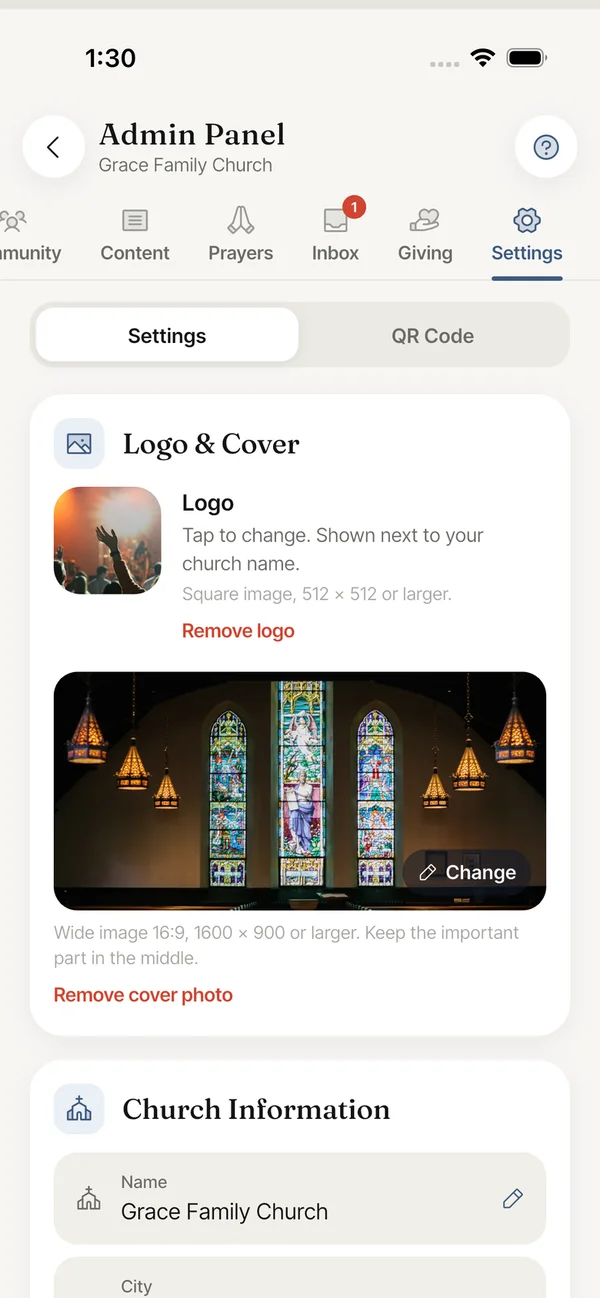
Where to edit
Everything below is in Admin Panel > Settings.
- Logo & Cover. The logo is a square image, 512 x 512 pixels or larger. The cover is a wide 16:9 image, 1600 x 900 or larger. Keep the important part of the cover in the middle.
- Church Information: Name, City, Address, Address line 2, ZIP / Postal code, Denomination and Description. Tap a row to edit it.
- Service Schedule: tap Add Service, enter a name and a time.
- Contact: Email, Phone and Website.
- Social Links: your church links, for example your website or YouTube channel.
What a well-filled page has
- A logo and a cover photo.
- A description of two or three sentences: who you are and who is welcome.
- At least one service time and the address.
- A phone number or email so people can reach you.
- One announcement, one upcoming event and one sermon.
- A few prayer needs in the Prayer block. See Add church prayer needs.
Still stuck? Write to support@faithly.church, or read the FAQ.