Set up Giving
Show members how they can give to your church: payment methods and recommended causes.
The Giving block on your church page shows members where and how to give. Faithly shows the details you enter. It does not process gifts: members use the payment method you list, for example Zelle or your bank.
Add the details
- Open Admin Panel > Giving.
- Write a short Description for members (up to 1000 characters).
- Tap Add Payment Method. Enter the Bank / Service (for example Chase, Zelle, PayPal) and the Account / Email / Number. You can add up to 5.
- Optionally tap Add Cause to recommend a cause: a name, a short description, a goal amount, an organizer and an icon. You can add up to 10.
- Tap the button at the bottom. Its label tells you what will happen: Save details (saved until you are Verified), Publish details (live right away) or Submit change (see below).
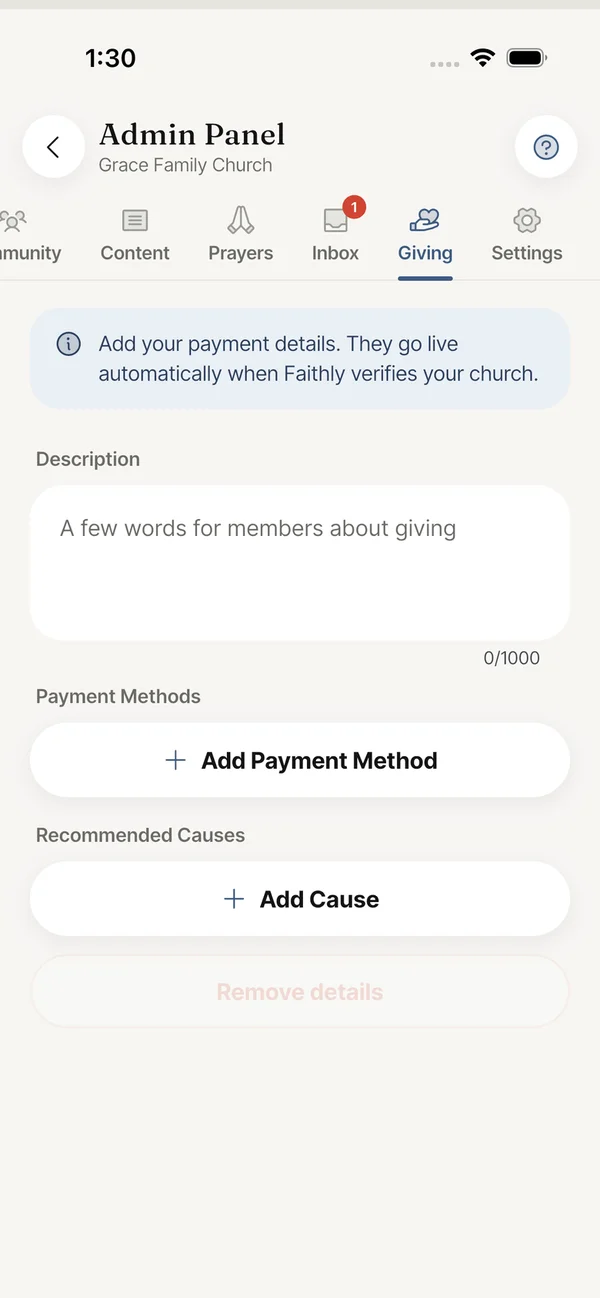
Only the church owner and church admins can change Giving details. A status line at the top of the tab always says what members currently see.
Still stuck? Write to support@faithly.church, or read the FAQ.